
From time to time you may want to prevent your Mac from automatically going to sleep. (For example, so that it's available for IT work after-hours.)
The simplest way to prevent your Mac from sleeping is to open System Preferences > Energy Saver and check the box labeled "Prevent computer from sleeping…".
If the Mac is a laptop, you also need to:
- Connect it to power
- Leave the lid open
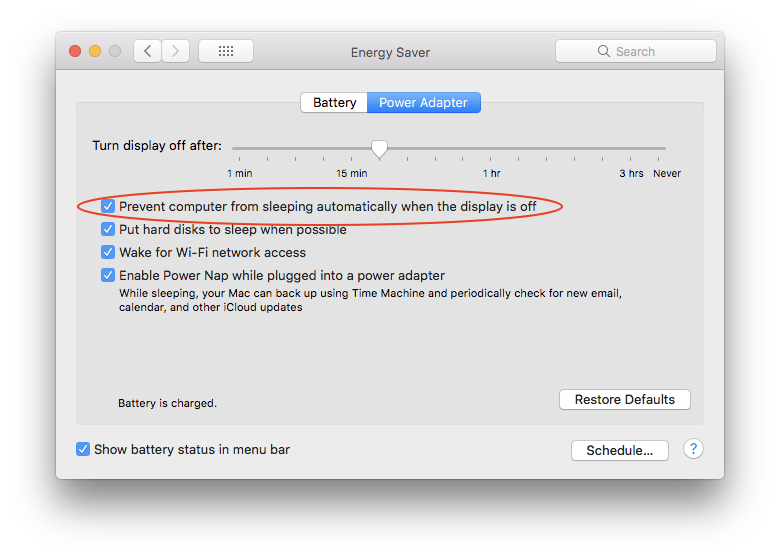
This works well — but you need to remember to change the setting back!
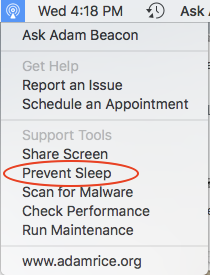
Another way to keep the Mac awake is with an app called Amphetamine. You can launch Amphetamine by choosing “Prevent Sleep” from the Beacon menu.
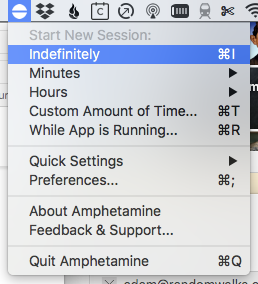
Once Amphetamine is running, look for the icon in your menu bar (it looks like a round pill) and choose the appropriate duration, which may be ‘Indefinitely’ or ’Hours > 12 Hours’.
Comments
0 comments
Article is closed for comments.